age my baby generator
Age your baby, one photo at a time
You look at that face every day and wonder who it turns into. Add your baby’s photo and one of each parent, then pick a year — the toddler, the schoolkid, the teenager — the same eyes, the same smile, just older.
First age-up free · no card needed
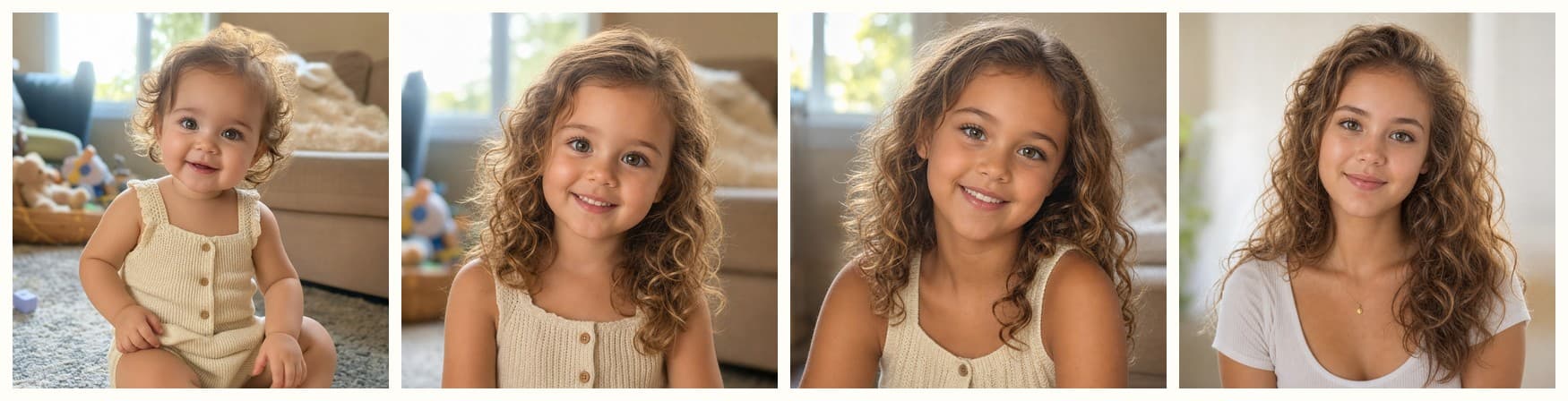
One uploaded baby photo, aged to 6, 10 and 18 with this tool
Add your photos
A clear photo of your baby — plus one of each parent when you are ageing them up.
Choose what you want
An age from 1 to 80, a theme, a film type — whatever this tool does.
Save and share
Your result lands in your private album, ready to download or send.
Age My Baby — FAQ
How many photos do I need?
Three: your baby, plus mom and dad. The parents’ adult faces tell the AI how this particular child matures — the result still shows only your child.
Can I try several ages?
Yes — run the slider to 5, then 10, then 18. Each render starts from the same photo, so the faces line up like a wall of school photos.
How does the age my baby generator work?
Upload a clear photo of your baby and choose what you want. Ageing also takes a photo of each parent, since their adult faces are the guide for how your child matures; every other tool runs from the baby photo alone. Most results are ready in under a minute.
Is it free to try?
Yes — your first age-up is free, no card needed. After that, affordable one-time credit packs unlock everything: more ages, themed photoshoots, filters, cards, names and keepsake films.
What happens to my photos?
The photos you upload are never kept — they are processed only to make your result and discarded as soon as it is generated. Results stay in your private album for 24 hours and are then deleted automatically, so download the ones you want to keep.